

How to Use Facebook Ad Dayparting to Optimize Your Results
Have you considered dayparting your ad campaigns?
In this article, you’ll discover how to use dayparting to schedule Facebook and Instagram ads to pause and run on specific days and times.

What Is Dayparting?
Dayparting is the practice of scheduling your ad campaigns to run only at certain times, on certain days, or at certain times on certain days to make your ads more appealing and relevant to users. It helps you optimize your campaigns by showing your ads only when they’re most likely to get results.
For example, if you find your audience will click on a campaign at any point during the day but are most likely to convert during evening hours, it makes sense to run campaigns only during those hours. This would increase your conversion rate and simultaneously reduce wasted clicks you’re paying for.
Some advertisers post during hours when their audience is most likely to see the ad; others post during peak hours when users are most likely to engage, click, or convert. For some businesses, these timeframes won’t overlap and specific windows of opportunity vary from business to business.
Dayparting can be particularly beneficial if your peak hours aren’t the same as traditional busy hours on Facebook. This means your competition will be lower overall during your peak activity times, likely bringing your cost down as a result.
#1: Pinpoint Days and Times Your Audience Is Most Active
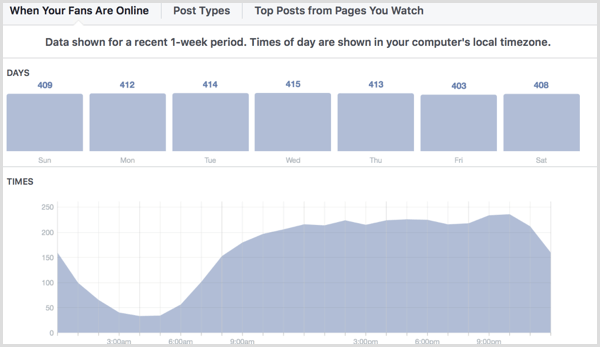
Facebook Insights and Instagram Insights can help you find the times your audience is most likely to take the desired action on your ads. Each platform has analytics reports that show you what days and times of day your audience is most active online. In Facebook Insights, go to the Posts tab and you’ll see a report showing when your audience is most active.
On Instagram Insights, navigate to the Followers section and then tap See More. Scroll down to find the charts detailing the hours and days when your followers are most active. You can view peak activity hours for every day of the week and see which days overall will benefit you most.
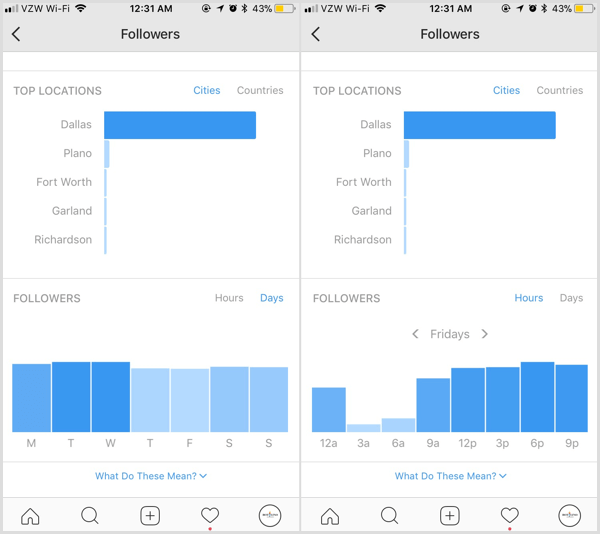
All else being equal, use this information as a starting point. Choose peak activity times and run your campaigns during those days and hours, and start split testing best ad display times to see what works for you.
You’re likely to notice that your audience’s active times are different on Facebook and Instagram, which is why it’s important to check both platforms’ data. If necessary, you can always run separate dayparting campaigns with Facebook-only and Instagram-only placements.
#2: Set Up a Dayparting Campaign Schedule in Facebook Ads Manager
Setting up dayparting ads for Facebook and Instagram ads is exceptionally easy. Create a new campaign and choose an objective, targeting, and placements as you normally would.
At the bottom of the ad set creation, you’ll see the Budget & Schedule section. To enable dayparting under the current system, you need to choose a lifetime budget for your ads instead of a daily budget.
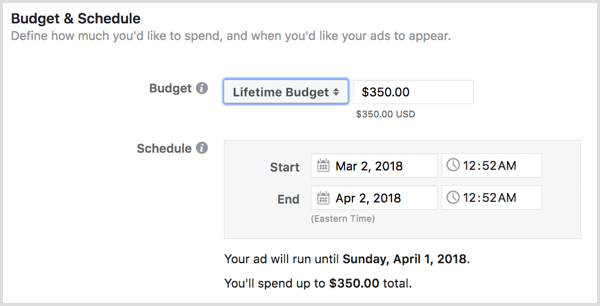
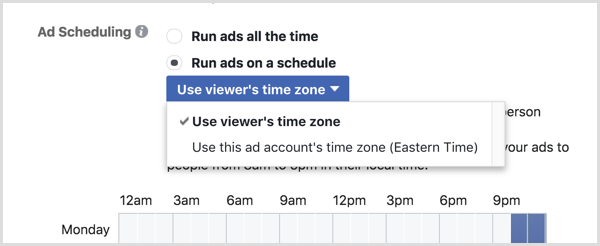
Once you’ve set a lifetime budget, you’ll see two Ad Scheduling options. Select Run Ads on a Schedule.

A block schedule pops up, showing the days of the week and hours of the day. You can choose specific hour blocks that are unique for each day or select certain hours for your post to run every day of the week. Do this by clicking on the schedule to choose when your ad will run.
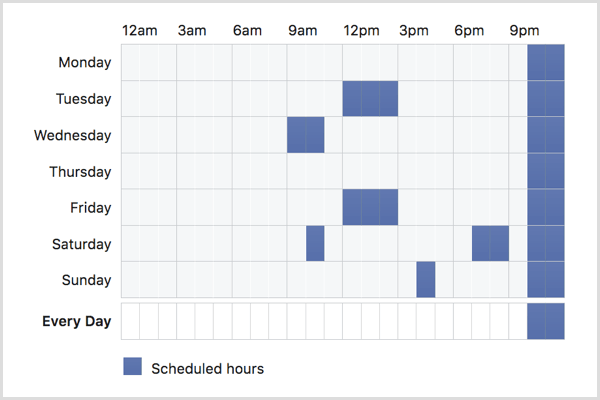
Before you finalize your dayparting schedule, you have one more important decision to make. You can choose to have your ad run during your designated times for your time zone or the viewer’s time zone. If you have an audience spread across multiple regions but know that they’re all most likely to be online or engaging at 9:00 PM, choose the latter.
#3: Adopt Best Practices for Dayparting
If you’re ready to set some of your ad campaigns to use dayparting, there are a few best practices you can implement to help you get better results and protect yourself from potential risks.
Use Manual Bidding
If you’re on a tight budget and want to ensure you don’t spend more per click or action than a set amount you can afford, consider using manual bidding. You can set a bid cap, which guarantees you’ll never spend more on an action than what you’ve manually chosen.
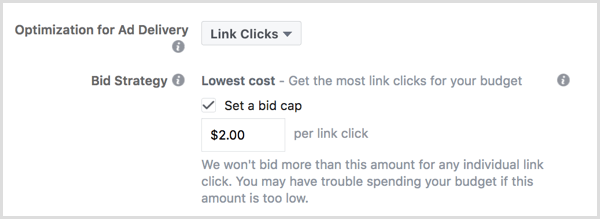
Note that this bid cap will be applied to each ad, not as an average cost cap, so this can limit more costly placements that may have otherwise balanced out in the average by lower-cost placements.
Consider Accelerated Delivery
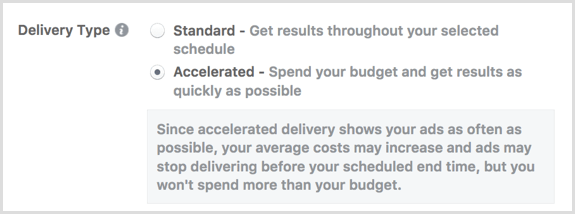
If you want to aggressively advertise something like a promotion or an upcoming event and you’re on a tight deadline, you can choose the Accelerated Delivery option in scheduling. Facebook will then show your ads as many times as possible during your allocated schedule, as opposed to trying to spread your budget out evenly over time.
Note that this tactic may cause costs to increase, so if you’re sticking to a budget, setting a bid cap can work in your favor.
Focus on Blocks of Time
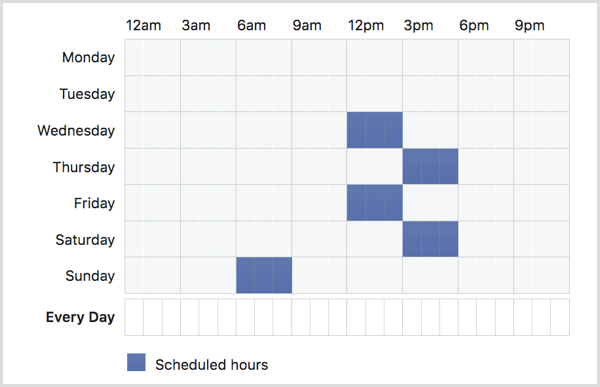
Typically shooting for blocks of time instead of one specific hour will help you get better results when you’re dayparting (and better reach just because of more placement opportunities).
To start, I typically test chunks of time in about 3-hour blocks. This is still specific enough to tell if the dayparting is having a positive effect, but it’s not immediately limiting in the same way as choosing a single hour would be.
Considerations for Dayparting
There are two big downsides to consider if you’re thinking about using dayparting strategies for your ad campaigns:
- Dayparting automatically limits your campaigns. This isn’t necessarily a bad thing off the bat, but it will keep certain ad placement opportunities off the table. All of the potential impressions you could have had during other hours of the day have been eliminated. You never know… a few of them could have even been clicks or sales.
- Perhaps more significantly, dayparting can sometimes result in increased ad costs. This will most likely happen if your peak activity times are the same as everyone else’s and there’s a lot of competition for those placements. More competition can mean higher ad costs, which can escalate quickly. You may see your CPC or ad spend jump, especially since you don’t have the other placements to average you out.
Dayparting isn’t for everyone, and it’s not for every campaign. If you notice a big spike in ad costs for the ads you’ve set to daypart, pause or stop them immediately.
Dayparting typically isn’t effective on large-appeal products that have diverse audiences such as razors or dog toys or baking sheets. Businesses that sell products like these can easily end up isolating some portions of their audience if they use dayparting, just because their audience is so diverse. This can spread peak activity levels across a larger number of times.
The exception to this rule is if you’re running niche campaigns designed to appeal to segmented groups of your audience. An example would be a general shoe store selling non-slip shoes during hours that servers or bartenders are most likely to be online.
Conclusion
Advertisers spend a lot of time and money to optimize their Facebook ad campaigns, working hard to squeeze every possible conversion out of every penny they spend. Dayparting, which allows you to run your ads only at specific times, is one optimization method that advertisers may test at some point.
If you’ve noticed or you believe that having ad placements shown only during certain hours or days would improve your ads’ performance, run a campaign testing your theory. Ultimately, split testing is the only true way to determine if dayparting is right for your campaigns and business.
What do you think? Do you ever use dayparting in your ad campaigns? How do you find the best days and hours when you want to optimize your campaign? Share your thoughts, knowledge, and experience in the comments below!